
방금 만든 쉐이더 코드 (만든 쉐이더를 더블클릭하면 볼 수 있다.)
Shader "Custom/NewSurfaceShader"
{
    Properties
    {
        _Color ("Color", Color) = (1,1,1,1)
        _MainTex ("Albedo (RGB)", 2D) = "white" {}
        _Glossiness ("Smoothness", Range(0,1)) = 0.5
        _Metallic ("Metallic", Range(0,1)) = 0.0
    }
    SubShader
    {
        Tags { "RenderType"="Opaque" }
        LOD 200

        CGPROGRAM
        // Physically based Standard lighting model, and enable shadows on all light types
        #pragma surface surf Standard fullforwardshadows

        // Use shader model 3.0 target, to get nicer looking lighting
        #pragma target 3.0

        sampler2D _MainTex;

        struct Input
        {
            float2 uv_MainTex;
        };

        half _Glossiness;
        half _Metallic;
        fixed4 _Color;

        // Add instancing support for this shader. You need to check 'Enable Instancing' on materials that use the shader.
        // See https://docs.unity3d.com/Manual/GPUInstancing.html for more information about instancing.
        // #pragma instancing_options assumeuniformscaling
        UNITY_INSTANCING_BUFFER_START(Props)
            // put more per-instance properties here
        UNITY_INSTANCING_BUFFER_END(Props)

        void surf (Input IN, inout SurfaceOutputStandard o)
        {
            // Albedo comes from a texture tinted by color
            fixed4 c = tex2D (_MainTex, IN.uv_MainTex) * _Color;
            o.Albedo = c.rgb;
            // Metallic and smoothness come from slider variables
            o.Metallic = _Metallic;
            o.Smoothness = _Glossiness;
            o.Alpha = c.a;
        }
        ENDCG
    }
    FallBack "Diffuse"
}
1. 쉐이더의 이름
Shader "Custom/NewSurfaceShader"
Shader "NewShader" // 이름을 바꾼다.
이름에 '/' 을 추가하면 위 쉐이더 그룹에도 폴더가 생긴다.
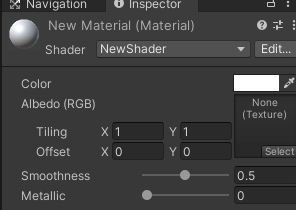
2. 쉐이더의 Properties
    Properties
    {
        _Color ("Color", Color) = (1,1,1,1)
        _MainTex ("Albedo (RGB)", 2D) = "white" {}
        _Glossiness ("Smoothness", Range(0,1)) = 0.5
        _Metallic ("Metallic", Range(0,1)) = 0.0
    }
Range : 들어올 값을 슬라이더 형태로 받을 수 있다.
Float : 들어올 값을 실수 형태로 받을 수 있다.
Color : 들어올 값을 컬러 형태 (r,g,b,a)로 받을 수 있다.
Vector : 들어올 값을 벡터(x,y,z,w) 형태로 받을 수 있다.
2D : 들어올 값을 텍스쳐 형태로 받을 수 있다.
    Properties
    {
        _TestRange("TestRange", Range(0,10)) = 0.0
        _TestFloat("TestFloat",Float) = 0.5
        _TestColor("TestColor", Color) = (1,1,1,1)
        _TestVector("TestVector",Vector) = (1,1,1,1)
        _TestTex2D("TestTex2D",2D) = "name" {}
    }
3. 쉐이더 언어
SubShader
    {
        Tags { "RenderType"="Opaque" }
        LOD 200

        //===================================================
        // 여기서 부터 쉐이더 언어
        //===================================================
        CGPROGRAM
        // Physically based Standard lighting model, and enable shadows on all light types
        #pragma surface surf Standard fullforwardshadows

        // Use shader model 3.0 target, to get nicer looking lighting
        #pragma target 3.0

        sampler2D _MainTex;

        struct Input
        {
            float2 uv_MainTex;
        };

        half _Glossiness;
        half _Metallic;
        fixed4 _Color;

        // Add instancing support for this shader. You need to check 'Enable Instancing' on materials that use the shader.
        // See https://docs.unity3d.com/Manual/GPUInstancing.html for more information about instancing.
        // #pragma instancing_options assumeuniformscaling
        UNITY_INSTANCING_BUFFER_START(Props)
            // put more per-instance properties here
        UNITY_INSTANCING_BUFFER_END(Props)

        void surf (Input IN, inout SurfaceOutputStandard o)
        {
            // Albedo comes from a texture tinted by color
            fixed4 c = tex2D (_MainTex, IN.uv_MainTex) * _Color;
            o.Albedo = c.rgb;
            // Metallic and smoothness come from slider variables
            o.Metallic = _Metallic;
            o.Smoothness = _Glossiness;
            o.Alpha = c.a;
        }
        ENDCG
    }
3-1. 설정 부문
        CGPROGRAM
        // Physically based Standard lighting model, and enable shadows on all light types
        #pragma surface surf Standard fullforwardshadows

        // Use shader model 3.0 target, to get nicer looking lighting
#pragma target 3.0전처리 또는 스니핏 이라고 부른다. 쉐이더의 조명계산 설정이나, 기타 세부적인 분기를 정해주는 부문
3-2. 구조체 부문
        struct Input
        {
            float2 uv_MainTex;
};구조체(struct) 를 선언한다. 엔진으로부터 받아와야할 데이터들이 들어간다.
3-3. 함수 영역
        void surf (Input IN, inout SurfaceOutputStandard o)
        {
            // Albedo comes from a texture tinted by color
            fixed4 c = tex2D (_MainTex, IN.uv_MainTex) * _Color;
            o.Albedo = c.rgb;
            // Metallic and smoothness come from slider variables
            o.Metallic = _Metallic;
            o.Smoothness = _Glossiness;
            o.Alpha = c.a;
}색상이나 이미지가 출력되는 함수를 작성하는 부문
3-4. 그외 부문
위 부문에 속해있지 않는 부문
'Unity > Unity_Shader' 카테고리의 다른 글
| 06. 쉐이더 변수로 색상 변경 (0) | 2023.04.25 |
|---|---|
| 05. 쉐이더로 색상 변경 (0) | 2023.04.24 |
| 03. Surface Shader 만들기 (0) | 2023.04.23 |
| 02. 렌더링 파이프라인 (0) | 2023.04.23 |
| 01. Shader란? (0) | 2023.04.23 |
